
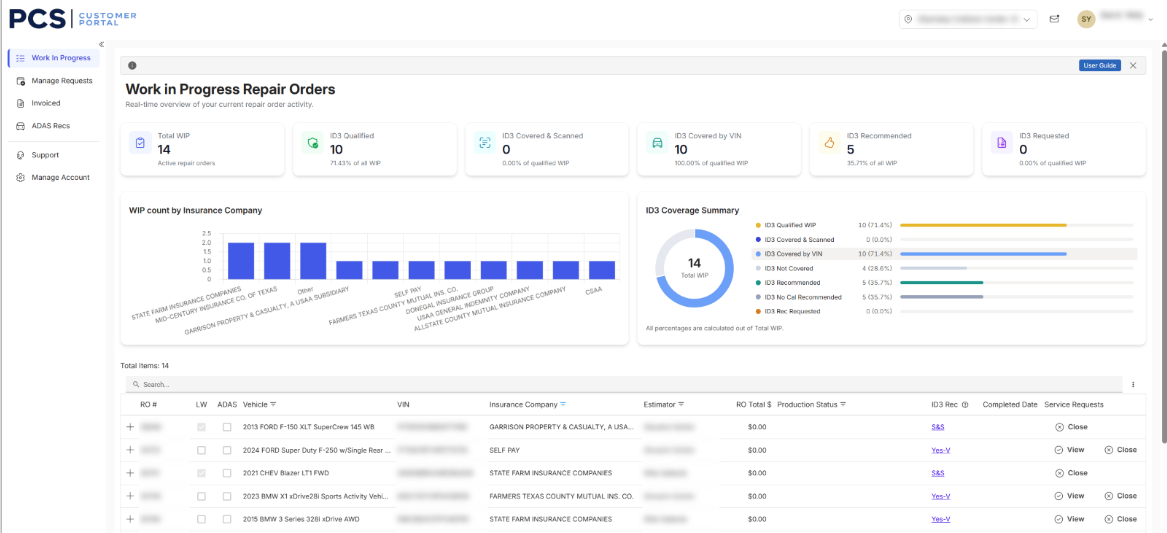
Within this screen, you will find your current Work in Progress. Information can be pushed from CCC One or manually added request, based on how your shop is configured.
This information includes the center RO number, the Vehicle Year/Make/Model and its VIN, Insurance Estimator, RO Total, Production Status (Optional), ID3 Recommended Services, Promised Date that was entered if using the CCC One integration, and Service Requests with an option to Close or View.
Tip: Utilize the Search bar to find your specific RO quicker.
On the work In progress tab, you can also find:
- WIP count by Insurance Company: Shows you visually how many vehicles you have per Insurance partner currently in progress. Hover over the bars to see the exact count.
- ID3 Recommended Services: Categorizes recommendations. Click on any one of the colored category fields to filter the results: WIP by Insurance Company, ID3 Chart and the WIP list.
Tip: To reset the filter, click the “clear” filter below the visual
- ID3 Recommendations Legend (if enabled):
- S = Source “Scan”
- V = Source “VIN Decode”
- NCR = No Calibration Recommended
- No = This Vehicle does not qualify
- FIR = Further Inspection Required
- View previously requested services for a vehicle by clicking the “View” option on that vehicle’s row, under Service Requests column.
- To print or save your results as a PDF, click the three vertical dots on the far right of the search bar.