
Three steps on your X-Link get you a 6-digit order code. Enter that code in the Protech customer portal to request your remote session.
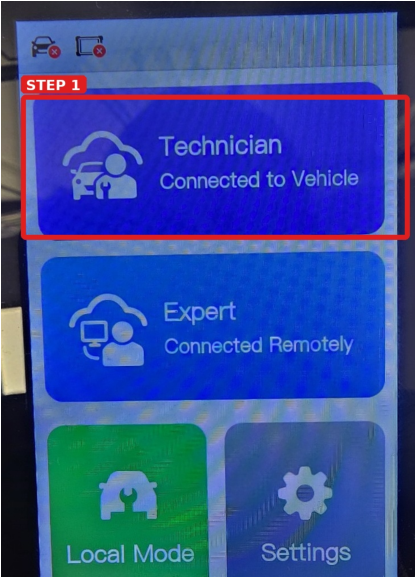
1. Tap Technician
From the X-Link home screen, select Technician.
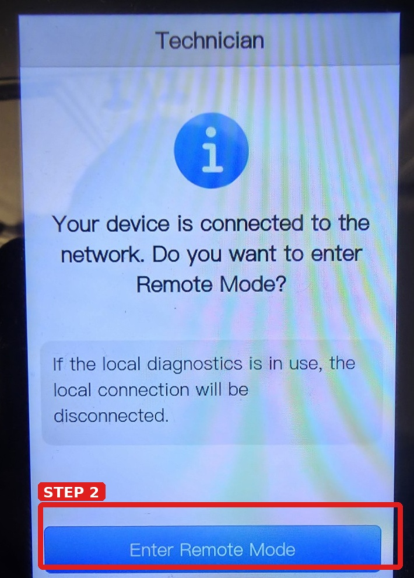
2. Tap Enter Remote Mode
When promoted, select Enter Remote Mode.
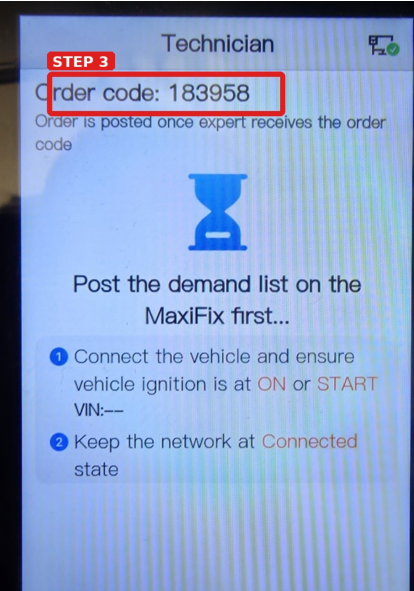
3. Document the
6-digit order code
Write down the order code shown at the top of the screen. You will enter it in the Protech customer portal.

Important: keep the X-Link connected
Keep the X-Link connected to the vehicle and keep the network connection active. Once the order code is provided, the remote expert can receive the session and begin remote diagnostics and programming.
NEXT STEP
Enter your order code in the customer portal
Log in to Protech Connected Solutions and add the order code to your service request.